Account Deletion & Data Removal
Last Updated: June 19, 2026
At DueIn, we believe in giving you full ownership and control over your data. If you decide to stop using our app, we make it simple to permanently delete your account and remove all your associated personal and financial information. This page explains the ways you can request or execute your account deletion.
1. In-App Direct Account Deletion (Recommended)
The fastest and most secure way to delete your account is directly inside the DueIn mobile application. This process is instant and automatically triggers our secure cascade-delete script on the database. Follow these steps:
- Open the DueIn app on your device.
- Tap the menu icon in the top-left corner to open the Navigation Drawer.
- Find the red Delete Account option located near the bottom, just above "Sign Out".
- A warning modal will appear. Read the warning carefully, and if you are sure, tap Delete to confirm.
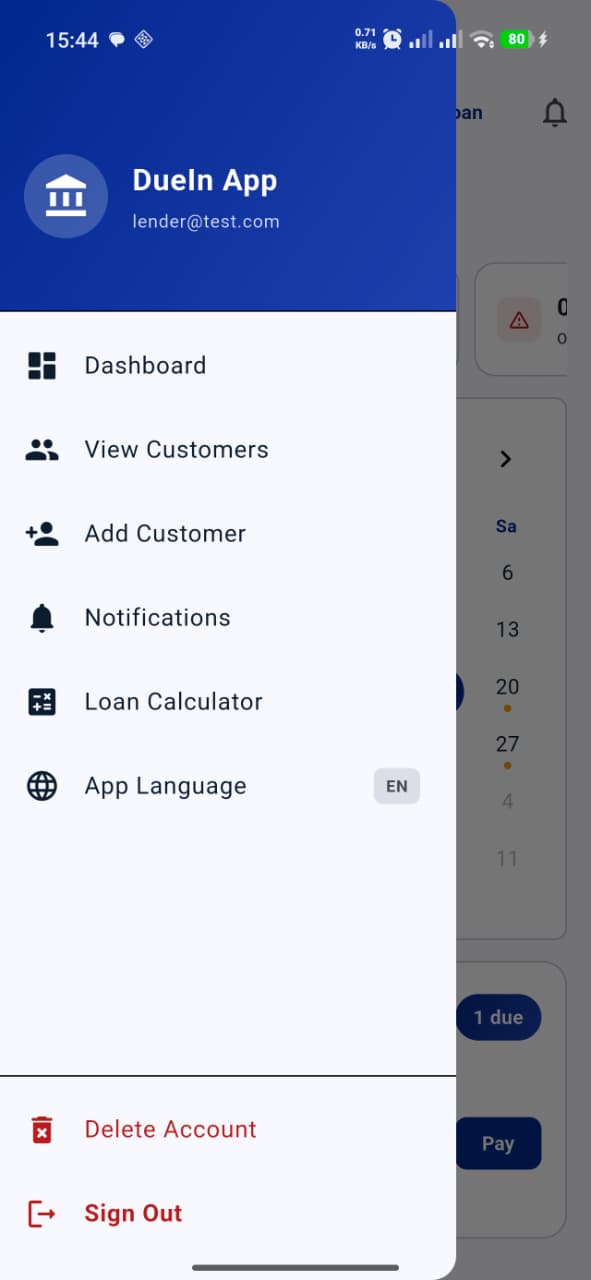
Step 1: Select the red "Delete Account" item from the Navigation Drawer.
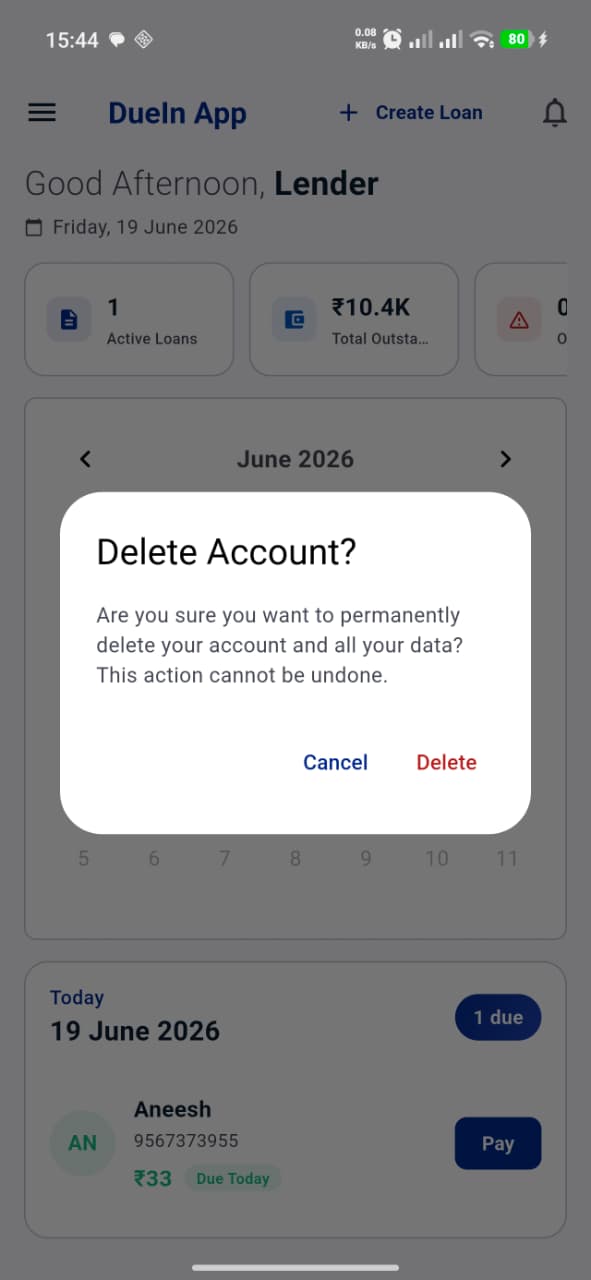
Step 2: Tap "Delete" in the confirmation box to verify you want all data wiped.
2. Online Deletion Request (Web fallback)
If you have already uninstalled the application or cannot access your mobile device, you can request account deletion online. To do this, please send an email from your registered email address to our support desk:
Support Email: dueinapp@proton.me
Email Subject: Account Deletion Request
Verification Details: Please include your registered full name in the email body. The request MUST be sent from the same email address registered with your DueIn account (e.g. your Google account email if signed in with Google).
Online deletion requests are processed manually within 48 hours of receipt. We will send you a confirmation email once your account has been completely removed.
3. What Data is Removed?
When you delete your account, either in-app or via an online request, we perform a permanent cascade-deletion of all records associated with your account from our secure database. This includes:
- Your user profile and registered authentication details.
- All customer profiles, contact numbers, and archives.
- All active and closed loan ledgers, principals, interest configurations, and notes.
- All payment schedule/EMI collection timelines.
- All payment transaction histories, audit logs, and in-app notifications.
Once this process is complete, none of this data can be recovered. We do not retain any backups or archives of your deleted datasets.
4. Data Retention
We do not retain any transactional or personal data for deleted users. The deletion is absolute. The only records we keep are transactional logging logs that do not identify individuals (such as standard server access logs or error telemetry reports) which contain no personal or financial information, kept purely for service monitoring.